Guided member review
SteelBox opens the right sheet and focuses the next unresolved member. No hunting through drawings.
SteelBox is structural steel takeoff software with AI drawing review, built by PencilHB for steel teams. It finds the steel members on your drawings, helps you measure and group them, and shows the evidence behind every suggestion. You confirm each decision.
3 drawings free · Google sign-in · No credit card
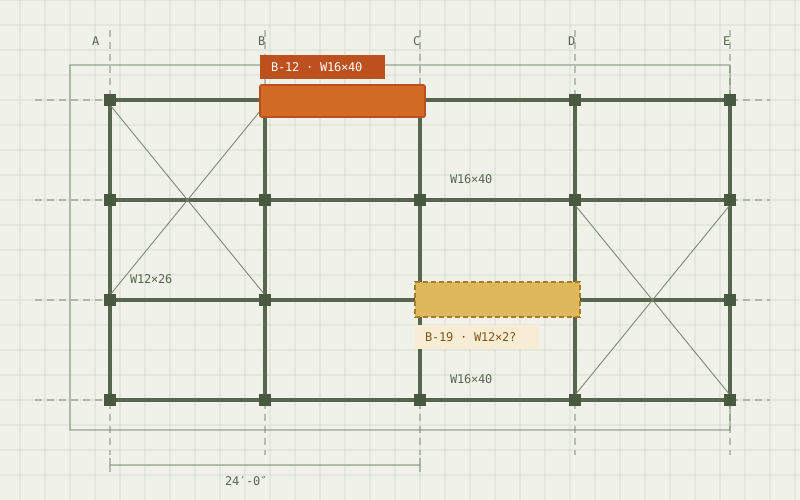
SteelBox now guides itself through structural drawings. The agent moves to the drawing evidence, prepares scale calibration, proposes member measurements and brings each decision to the engineer for confirmation.
AI moves. You verify. Engineering stays in your control.
SteelBox focuses on a known dimension on the drawing, traces it and prepares the scale calibration for your confirmation.
AgentFinds and traces the dimensionYouConfirm the scaleThe agent scans the sheet, marks the structural members it recognizes and prepares a measurement proposal for each one.
AgentDetects members, prepares lengthsYouNo searching sheet by sheetThe Auto Cursor takes you straight to each member and shows its member ID, section and proposed length on the drawing.
AgentFocuses and traces the memberYouCheck the evidence in placeDrag the start or end point if the length needs adjusting, then confirm. The agent moves on to the next engineering decision.
AgentAdvances to the next memberYouAdjust and confirmAI proposes.
Engineers confirm.
SteelBox automates the repetitive movement through complex structural drawings without hiding the engineering evidence behind a black box. Every calibration and every member length stays a proposal until an engineer confirms it.
The agent handles navigation, detection and measurement proposals for structural steel takeoff. Engineers keep the decisions, and professional review is still required.
Before anyone makes an engineering decision, hours go into finding members, matching labels and copying numbers between drawings and spreadsheets.
↻ Repeat for every member on every sheet
Less time searching. More time on engineering decisions.
SteelBox does the repetitive work. Every step that changes your numbers waits for you.
Step 01 · Upload drawings
SteelBoxReads every sheet: linework, text and section labels.
YouChoose the drawing set you want to review.
Step 02 · Find & organize
SteelBoxFinds members, reads section labels and marks, and groups them by section.
YouNothing yet. This is the searching you no longer do by hand.
Step 03 · Calibrate
SteelBoxGuides you to a clear, known dimension on the sheet.
YouClick its two ends and confirm the value to set the scale.
Step 04 · Review each member
SteelBoxOpens the right sheet, focuses the next unresolved member and shows its evidence.
YouConfirm, edit, reject or skip. Then SteelBox moves on.
Step 05 · Measure & group
SteelBoxFinds same-section members that could share a length.
YouApprove which ones do. Same section does not mean same length, and manual values are never overwritten.
Step 06 · Takeoff & BOM
| Mark | Section | Length | Weight | Status |
|---|---|---|---|---|
| B2-01 | W16×26 | 25'-0" | 650 lb | Confirmed |
| G2-01 | W18×35 | 30'-0" | 1,050 lb | Confirmed |
| C-A1 | W12×53 | 28'-0" | 1,484 lb | Confirmed |
| VB-01 | HSS6×6×3/8 | 28'-8" | 788 lb | Confirmed |
| Example total | 3,972 lb | |||
SteelBoxCollects reviewed members, lengths and sections for takeoff and BOM.
YouDo the final review. The takeoff and BOM workflow is under active development.
Upload a drawing, review detected steel members, calibrate the sheet, check measurements and move toward a reviewed takeoff.
No credit card required · Google sign-in
Rotate the frame, click any member, then confirm it or ask for the next unresolved one. This is how review in SteelBox feels: one clear decision at a time.
Drag to rotate · Click a member
The frame above is an illustration. The button opens the real SteelBox workspace: create a free account and test up to 3 structural drawings.
3 drawings free · Google sign-in · No credit card
Every AI suggestion stops at an approval gate. Nothing becomes project data until an engineer accepts it.
Try it: you are the approval gate.
SteelBox opens the right sheet and focuses the next unresolved member. No hunting through drawings.
The drawing stays big. Panels collapse, and zoom, fit and pan keep the context in view.
Set the scale once, then measure point to point. No AI-generated dimension is trusted silently.
Measure one member and apply it to approved similar members. Conflicts are protected.
Every suggestion links back to its source region, with confidence and context you can inspect.
Reviewed members move toward takeoff and BOM with auditable decisions behind them.
Get from a drawing set to reviewed quantities with less searching. See SteelBox for structural steel estimating.
Check member lists against the drawings before planning work.
Review members with the drawing evidence in view.
Find marks, sections and missing members across sheets.
Understand the steel scope earlier in preconstruction.
SteelBox finds. SteelBox focuses. SteelBox suggests. The engineer decides.
Automation should remove searching, not engineering judgment.
No. SteelBox is AI steel takeoff software, not an automatic one. It automates the searching, navigation and evidence gathering. Engineers confirm members, measurements and groups. AI suggestions never become project data on their own.
Structural steel estimators, fabricators, detailers, structural engineers and preconstruction teams who review structural drawings.
Yes. Create a free SteelBox demo account with Google and test up to 3 structural drawings. The product is still actively evolving, so engineering review remains required.
You can try up to 3 structural drawings free in the SteelBox demo. Commercial pricing is not public yet. For team, pilot or production use, contact mail@pencilhb.com.
No. Quantities and engineering decisions still need review by qualified professionals against the drawings, specifications and applicable standards.
Want the manual method first? Read how to do a structural steel takeoff from drawings or browse all guides. Estimators can read how SteelBox fits the estimating workflow.
The free demo is for trying the workflow. For larger drawing volumes, team evaluations or commercial pilots, talk directly with the SteelBox team.
See how AI-guided drawing review can move your steel workflow toward takeoff, with you in control. Read how a takeoff runs in SteelBox.
PencilHB Data runs managed field collection on construction sites, in workshops and in warehouses, including egocentric and multi-view capture.